Silhouette America · Vinyl cutter mats
Silhouette Cameo Standard, Light Tack and PixScan Mat Set
Standard, Light Tack and PixScan mat set
Price and purchase ↓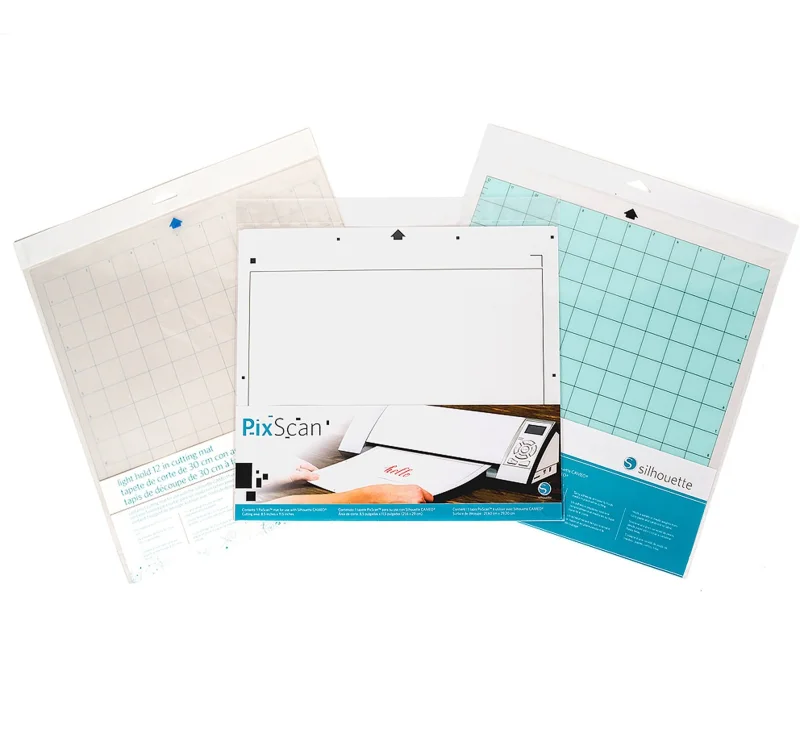
Check the exact model and material
Check the mat and software instructions for your exact Cameo. Measure against the marked PixScan area for the third mat instead of planning from the square grid of the other two.
When to choose it
The two gridded mats cover ordinary work that calls for standard or light tack. The third mat gives you the PixScan workflow when a cut needs to follow artwork already on a sheet.
Specifications
- Brand
- Silhouette America
- Supply type
- Standard, Light Tack and PixScan mat set
- Best suited for
- Choose between a regular cutting grid and placing a cut around existing artwork
- Contents
- Standard Tack mat, Light Tack mat and PixScan mat
- Regular mats
- 12 x 12 in. format
- PixScan
- Separate marked working area
- Documented listing examples
- Cameo 1, 2 and 3
- Pack
- Three mats
- Amazon.com reference
- B01J236D6K
Advice and other choices
Check the exact model and material ↑
Compare options in this department ↗
Documentation
Questions about this product
Are all three mats the same grip?
The package shows a regular mat, a light-hold mat and a marked PixScan mat.
Which mat should I use for an existing print?
Use the compatible PixScan workflow when you need to locate a cut relative to a physical image.
Which format has the square cutting grid?
The standard and light-tack mats in the listing are the 12-inch square format.